
10DLC Registration Guide
TL;DR: To send SMS to US numbers, you need to register your business and messaging use cases. Sent handles the submission on your behalf. You fill out the form in our platform, our compliance team reviews it, and we submit to TCR. Most approvals take 1–3 business days.
What is 10DLC?
10DLC stands for 10-Digit Long Code. If your business sends texts to US phone numbers, this applies to you.
10DLC is the US registration system for A2P (Application-to-Person) SMS — messages sent by software to people, as opposed to two people texting each other.
For years, businesses could send SMS from regular 10-digit numbers with no registration required. Carriers (AT&T, Verizon, T-Mobile) couldn't tell a legitimate business from a bot farm, so in 2019 they built a gating system.
Registration now happens through TCR (The Campaign Registry), which acts as the central record-keeper for all 10DLC submissions. You tell TCR who you are and what you're sending. In return, your messages get treated as legitimate traffic by the carriers.
How the submission process works
Every 10DLC submission has two parts, reviewed very differently.
Brand verification
TCR verifies your business is real using the information you provide. This is algorithmic, fast, and mostly a lookup against existing business registration data.
Brand name matters. This field should not be your official legal name — it should be how your customers actually know you. If your LLC is registered as "Kevin's Donuts LLC" but your website and receipts say "Kevin's Donuts," use the latter. That's what appears in messages to your customers and needs to match what they'd recognize.
Campaign approval
This covers the type of messages you're sending, who's receiving them, and sample examples. Unlike brand verification, this is manually reviewed by a human, which is where things get inconsistent. The same campaign description can pass or fail depending on who reviews it. Rejection error codes (805, 806, 851) give you a category of problem but not specific guidance on what to fix.
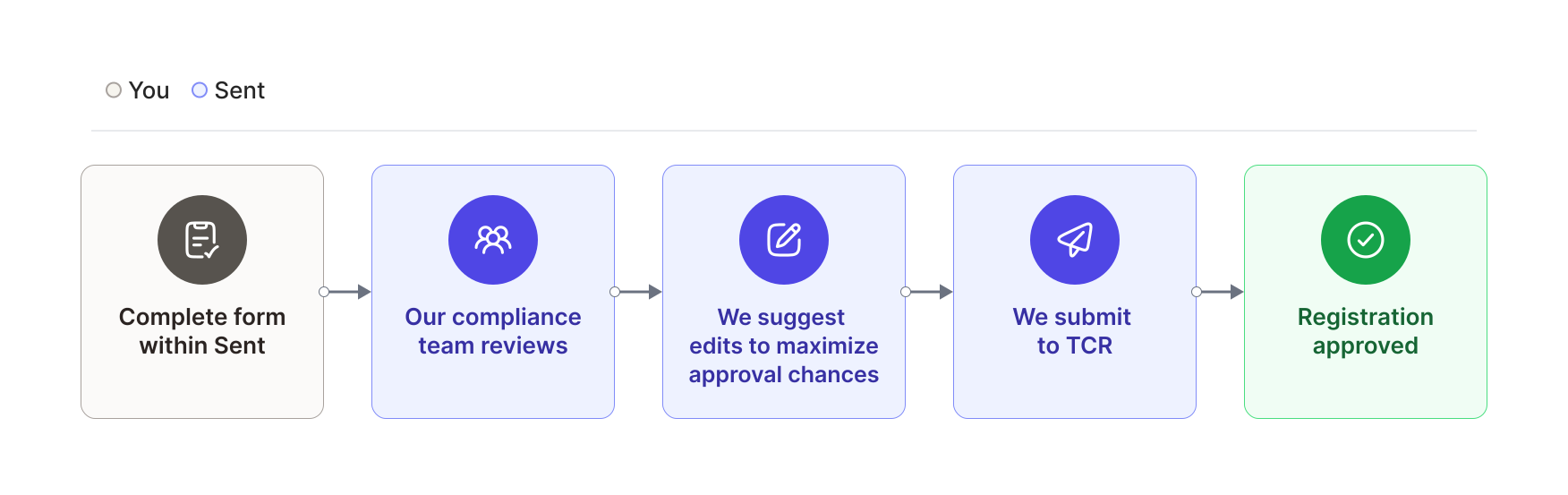
Applying through Sent
Step-by-step guide to completing your 10DLC brand and campaign registration for compliant SMS messaging in the US.
Playlist
Fill out the form
Submit your business and campaign details through the Sent dashboard. Our form collects everything TCR requires.
Compliance review
Our compliance team reviews your submission and gives you feedback to maximize your chances of approval before it reaches TCR.
TCR submission
We submit your registration to TCR on your behalf.
Approval tracking
We track the review and notify you when you're approved, or if anything needs fixing.
Most submissions come back approved within 1–3 business days.
If your submission is rejected, our compliance team reviews it and gives you specific steps for resubmission. All Sent customers — including those who haven't sent any messages yet — get compliance support throughout this process.
Choosing the right campaign type
Pick the use cases that reflect what you're actually sending. Don't try to game this — carriers flag mismatches between your registered use case and your actual messages.
| Use case | When to use |
|---|---|
| Marketing | Promotional offers, discounts, announcements |
| Customer care | Support conversations, ticket updates |
| 2FA / OTP | One-time passcodes, login verification |
| Account notifications | Password resets, balance alerts |
| Appointment reminders | Booking confirmations, schedule changes |
| Delivery notifications | Order shipped, out for delivery |
| Fraud alerts | Suspicious activity notices |
If you have multiple use cases, a mixed-use campaign covers them all under one brand. For smaller senders, low-volume mixed offers the same flexibility with a cap of 2,000 messages per day — this is usually what we recommend for growing businesses and startups.
TCR fees
TCR charges pass-through fees for campaign registration. Sent waives the first 12 months of these fees.
| Campaign type | TCR fee |
|---|---|
| Low-volume mixed | $1.50/month |
| Standard / high-volume | $10.00/month |
What goes into a campaign submission
Campaign description
Keep this short: one or two sentences covering who's sending, what they're sending, and why.
Opt-in method
You need to document how you get consent from people before texting them. TCR calls this your message flow.
Someone fills out a form on your site. You provide the URL and describe how they get there. The form itself has its own requirements (see below).
Gathered over the phone or in person. Document the script used, where the contact info is published, and whether it's phone or in-person. Marketing use cases require double opt-in if consent is spoken.
You publish a number and keyword, and subscribers text it to opt in. Best practice is to display the full disclaimer wherever you publish the number.
A physical form collected during an in-person visit, with a hosted screenshot submitted as documentation.
Opt-in form requirements
If your 10DLC keeps getting rejected, the form is usually why. Carriers are strict about explicit consent — missing even one element is enough to fail.
If you're using a web or paper form, it needs all of the following, clearly visible before the user hits submit (not buried in fine print):
-
Program name — make it clear who is texting them and what the program is
-
Message frequency — something concrete, like "Max 4 msgs/month," not just "frequency may vary"
-
Cost warning — "Msg & data rates may apply"
-
Opt-out info — "Reply STOP to opt out" or "Text STOP to cancel"
-
Legal links — direct links to your Privacy Policy and Terms of Service
-
Full disclaimer (or equivalent):
You are opting in to receive [message types] from [Brand]. Msg and data rates may apply. Msg frequency may vary. Reply HELP for help or STOP to opt out. No mobile information will be sold or shared with third parties for promotional or marketing purposes.
-
SMS consent is voluntary, distinct, and explicit — typically an unchecked optional checkbox
-
The checkbox cannot be pre-checked
For marketing campaigns, the language should make clear the messages are promotional. For charity or political campaigns, note whether donations will be solicited.
Autoresponse requirements
Every 10DLC campaign needs three documented autoresponses. Each has required elements.
Triggered by START or a related keyword. Must include:
- Brand name
- Reply HELP for help
- Reply STOP to opt out
- Msg and data rates may apply
- Msg frequency may vary
Example:
[Brand]: Welcome! Please reply HELP for help. Message frequency may vary.
Msg & data rates may apply. Reply STOP to opt out.
Triggered by STOP or related keywords. Must include:
- Brand name
- Unsubscription confirmation
- Notice that no more messages will be sent
Example:
[Brand]: You have been unsubscribed and will not receive more messages.Triggered by HELP or related keywords. Must include:
- Brand name
- An email, toll-free number, or URL where support can be reached
Example:
[Brand]: Please contact us at [email / toll-free number / URL] for support.Sample messages
For each use case you select, submit at least one sample message. Mixed and marketing use cases require two. Every sample must include the brand name and look like a real message.
| Use case | Example |
|---|---|
| Marketing | [Brand]: Thanks for opting in! Use code DISCOUNT20 for 20% off through the end of the month. |
| Account notification | [Brand]: Your password has been reset. |
| 2FA | [Brand]: Your code is 123456. |
| Customer care | [Brand]: Thanks for your message! We'll be right with you. |
| Delivery notification | [Brand]: Your order has been delivered. |
| Fraud alert | [Brand]: We noticed a suspicious transaction. Log in or call us to complete it. |
You can update sample messages later. What you cannot do later is send messages that fall outside your registered use cases.
Agencies and resellers
If you're sending on behalf of clients, each business needs its own campaign registration. You can't bundle clients under a single campaign — TCR ties campaigns to the business actually responsible for the messages.
You can submit registrations manually for each client through the dashboard. If you're managing multiple brands, we recommend collecting the required information within your platform and submitting programmatically via the API. Reach out to support and our team can help you build this out.
Ready to register?
10DLC is regulatory overhead, but it's a one-time lift. If you get stuck at any point, email support@sent.dm — we read everything.
Start your registration in the Sent Dashboard under Settings → Compliance → 10DLC Registration.